
System integration means connecting different IT systems so they can share information automatically. Instead of an employee entering the same details in several systems, the information is transferred by itself – for example from an e-service to a business system, or from a form to a CRM.
In this article we look at why system integration is needed, common ways to integrate and what an integration platform (iPaaS) is.
Why is system integration needed?
Most organisations use many different systems: email, forms, CRM, finance systems, records management systems and business systems. When the systems don’t talk to each other, manual work fills the gaps.
- Duplicate data entry: the same details are entered several times.
- Risk of errors: every manual transfer is a chance to make a mistake.
- Longer processing times: cases wait for someone to transfer them.
- A fragmented view: nobody has the full picture of the customer or the case in one place.
With system integration, information flows automatically to where it is needed, and employees can spend their time on the case itself.
Common ways to integrate systems
There are several ways to connect systems. Which one fits depends on how many systems are involved and how quickly the information needs to move.
Point-to-point
Two systems are connected directly to each other. This works well for a single connection, but as the number of systems grows there are many separate connections to keep track of and maintain.
API
An API (Application Programming Interface) is an interface that lets one system fetch or send information to another in a standardised way. Most modern systems have APIs, and they are often the foundation of integrations.
Events and message queues
Instead of asking a system whether something has changed, the system sends a message when something happens – for example that a new case has been created. Other systems listen for the message and act immediately. Examples of such services are Azure Service Bus, RabbitMQ and Apache Kafka.
Integration platform (iPaaS)
An integration platform, often called iPaaS (Integration Platform as a Service), gathers all connections in one place. Instead of many separate point-to-point connections, the integrations live in one platform where they can be built, monitored and changed. Many platforms have ready-made connectors to common systems, so you don’t have to build everything from scratch. Read more about integration methods and iPaaS.
Examples of system integration
E-services and business systems in municipalities
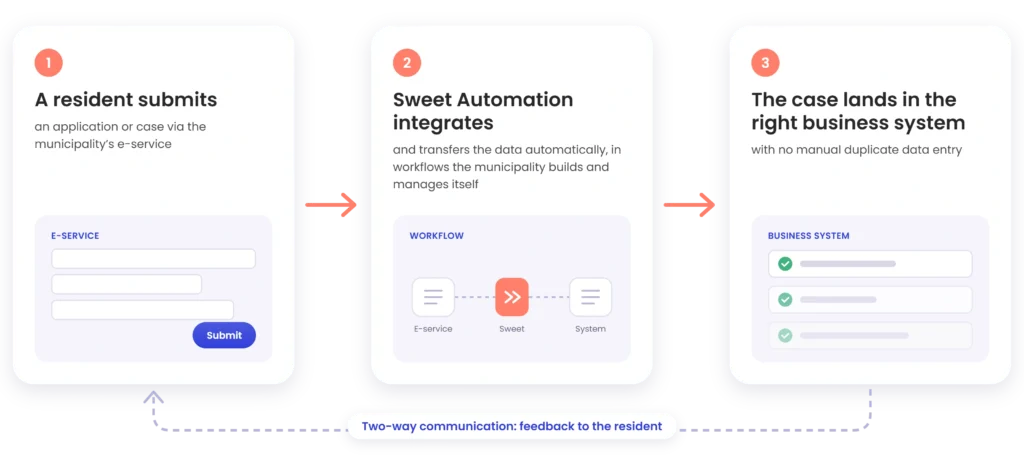
Municipalities receive applications and cases through e-services, which often need to be registered in a business system or records management system. Without integration, they are entered by hand. Söderhamn Municipality connected its e-services to its records management system using Sweet Automation. Cases are now transferred automatically, with no manual duplicate data entry.
Forms and e-signing
A digital form can be connected to an e-signing and authentication service, so the customer can identify themselves and sign directly in the flow. Sweet integrates with e-signing partners for this.
Email and calendar
Incoming email can be read in and automatically create cases or leads, and activities can be synced between the email client and the CRM system.
CRM and other business systems
When the CRM system is connected to other systems – for example email marketing, a digital mailbox or other CRM platforms – customer information is where it is needed without anyone moving it manually. See Sweet’s ready-made integrations.
System integration with Sweet Automation
Sweet Automation is a platform for automation and integration (iPaaS). With rules, triggers and ready-made connectors, you can connect CRM, forms and other systems and automate processes end to end, for example onboarding, customer journeys and case flows.
- Ready-made integrations: connectors to email, calendar, e-signing, digital mailbox and email marketing, among others.
- Real-time events: Sweet can listen to events in other systems via messaging services such as Azure Service Bus, RabbitMQ, Apache Kafka and Google Pub/Sub, and trigger automations when something happens.
- APIs: for connections that aren’t available out of the box.
- Hosting: the platform runs in Microsoft Azure or is installed on-premises.
- Complements existing systems: Sweet Automation doesn’t necessarily replace the systems you already have – it connects them.
“Through Sweet, we received a ready-made integration between Open ePlatform and Ciceron. Thanks to the intuitive and user-friendly interface in Sweet Automation, we can manage and maintain the integration ourselves without relying on external consultants.”
– Robin Sehlin, Digitalisation Strategist, Söderhamn Municipality
Frequently asked questions about system integration
What is the difference between system integration and an integration platform?
System integration is the connection between systems itself. An integration platform is a tool where several integrations are built and managed in one place.
What does iPaaS mean?
iPaaS stands for Integration Platform as a Service – an integration platform delivered as a service.
Do you need a developer to integrate systems?
It depends on the integration. With an integration platform and ready-made connectors, many integrations can be set up and managed without custom development. Söderhamn Municipality, for example, manages its integration itself in Sweet Automation.
Which systems can be integrated?
In principle any system that has an API or supports standard protocols, for example email, CRM, e-service platforms and business systems.
Want to connect your systems?
Tell us which systems you use today, and we’ll show you how Sweet Automation can connect them.
